By the end of this install, you ask Claude "What does tomorrow look like, and what should I prepare?" and it answers from your real calendar, in terms shaped by a context file that knows what you run and how you decide. And it does this inside a workspace you have hardened: model training switched off, an incognito habit for sensitive one-offs, and a written decision — the Lane Decision — about which Claude account is allowed to touch which data. Fifteen minutes of setup, made once. Every install that follows stands on this one.
Prerequisites
- A Claude account you pay for personally (Pro is enough), open at claude.ai in a desktop browser
- A personal calendar and email — Google or Microsoft — that is not your work account
- One fact worth chasing from IT before you start: does your company have Claude Team or Enterprise? (If you can't find out in five minutes, assume no and proceed — you can upgrade the decision later.)
- 15 minutes
Build steps
-
Turn model training off. On your personal account, open Settings → Privacy and switch off the option that allows your chats to be used to improve Claude's models. Don't assume your sign-up choices got this right — check the toggle now. This is the most important switch in the entire curriculum, and it takes thirty seconds.
-
Adopt the incognito habit. From the new-chat menu, start an incognito chat. Nothing in it is saved to your history or remembered later. The habit to install: anything you would hesitate to have on file — a health question, a salary negotiation, a problem with a colleague — goes in incognito. Everything else runs normally.
-
Take the Lane Decision. This is the rule that makes the rest of the curriculum safe to run. Paste this into Claude:
I'm deciding how to use Claude safely alongside my job. Ask me these three questions one at a time:
1. Does my employer provide Claude Team or Enterprise?
2. Do I handle data covered by NDAs, client confidentiality, or regulation (GDPR, health, financial)?
3. Do I want Claude for personal life admin as well as work thinking?
Then write my "Lane Decision" as two short rules I can save. Apply these principles: my personal Claude account never connects to work email, calendar, or files, and never sees raw company data — work data may only enter it anonymized. A company Claude Team or Enterprise account is the only place work tools and raw work data belong.
Keep the two rules it gives you — they go at the top of your context file in step 5.
-
Connect calendar and email — in the right lane only. Open Settings → Connectors and connect your personal Google or Microsoft account for calendar and email. The rule with no exceptions: your work email, work calendar, and work drive never connect to your personal Claude. If the only calendar you actually live by is the work one, leave it unconnected for now — Install 2 shows you the safe workaround, and the Two-Lane note below shows the full fix.
-
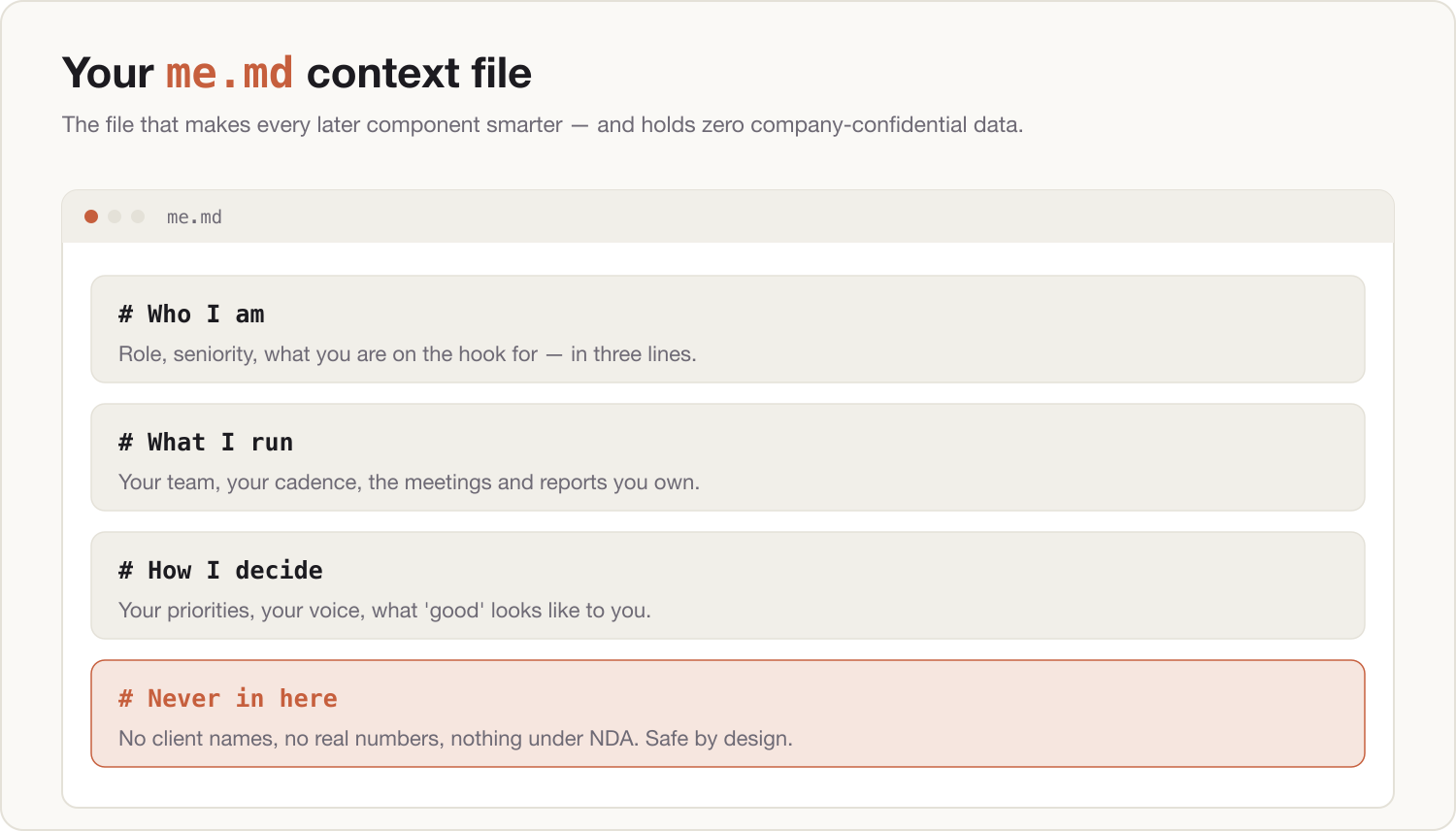
Write your me.md. This is the context file that makes every later component smarter. Paste this and answer honestly:
Interview me to build a context file called me.md. Ask one question at a time, eight questions total, covering: my role and what I actually run week to week; who I answer to and who answers to me (roles only, never names); the three recurring outputs I produce; how I like to communicate (tone, length, formality); how I make decisions and what I optimize for; my current top three priorities in general terms; what Claude should always do and never do when working with me; my working hours and weekly rhythm. Then output me.md as clean markdown. Hard rule: the file must contain zero company-confidential information — no company names, client names, real financial figures, or anything covered by an NDA. Where the true detail is confidential, generalize it.When it produces the file, read it once with a single question in mind: if this leaked, would I care? Edit until the answer is no. Prefer filling in blanks? Use the me.md template in the downloads instead.
-
Install the context file. Create a Project called My OS and paste me.md into the project's instructions. Every chat you start inside that project now begins already knowing you. Keep the file itself too — later installs build on it.
-
Prove it works. Inside the My OS project, run:
Using my context file and my calendar, give me tomorrow's plan: the three things that matter most, what to prepare for each meeting, and one thing I should cancel or shorten.If the answer reads like it was written by someone who knows your job and your diary, the kernel is installed.
The Two-Lane note
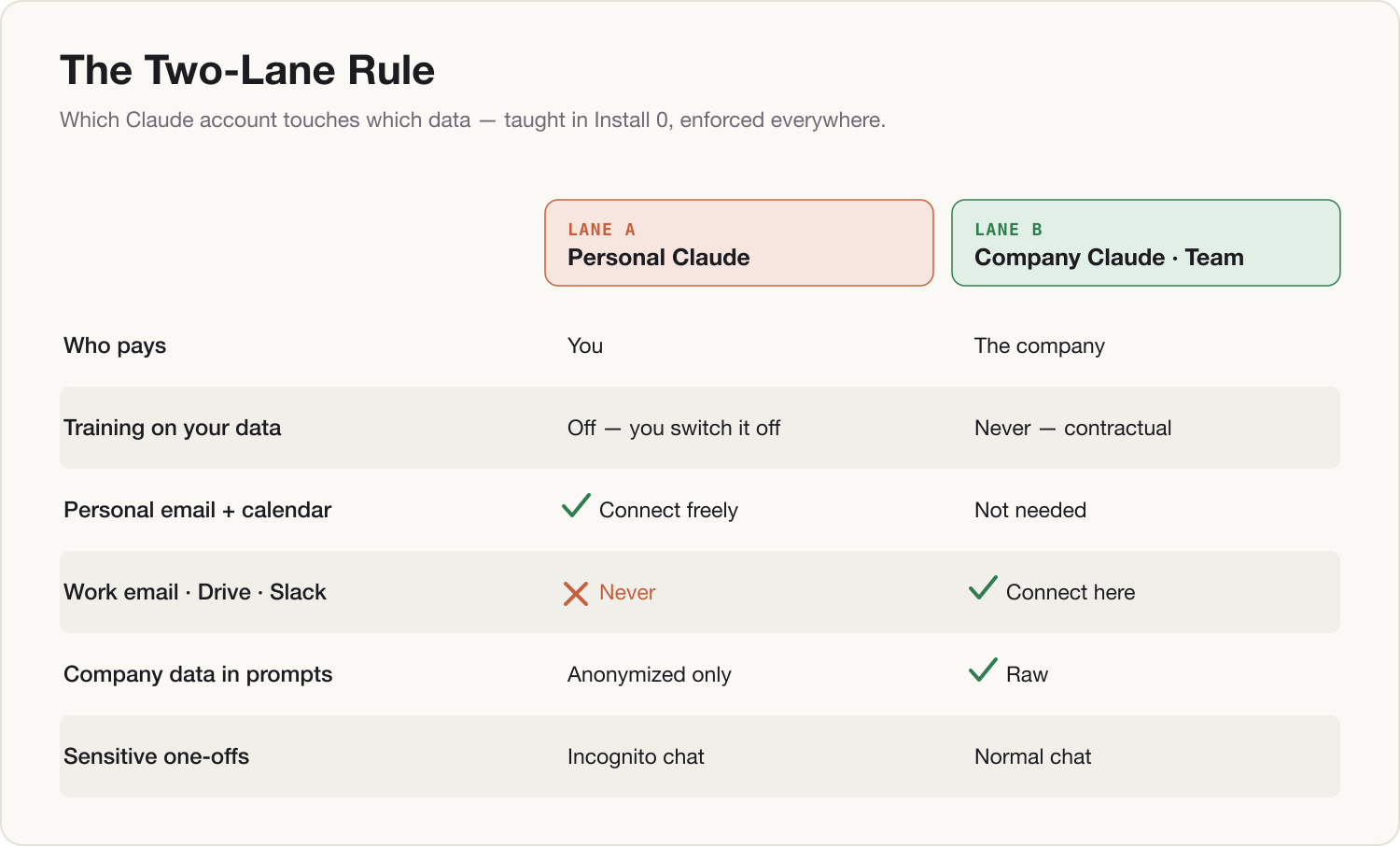
Lane A — personal Claude only (most readers today). Everything above happens on your personal account: training off, incognito habit, personal calendar and email connected, me.md with zero confidential content. Raw work data never enters this lane. Work thinking still can — Install 0.5 builds the firewall that makes that safe.
Lane B — your company has Claude Team or Enterprise. Do steps 1–3 on your personal account anyway; the lanes coexist. Then repeat steps 4–7 on the company account: connect your work calendar and email there — training is off contractually, so raw work data belongs in this lane — and write a second, fuller me.md that can name your company, projects, and priorities openly. You finish with two kernels: personal life in Lane A, work in Lane B, and nothing crossing between them.
Component shipped
A hardened workspace — training off, incognito habit installed, the Lane Decision in writing, calendar and email connected in the correct lane — plus a me.md context file living in a project that every future component will read. Tomorrow morning, open My OS and ask: "Given my calendar and my priorities, what's the one thing I should move forward today?"